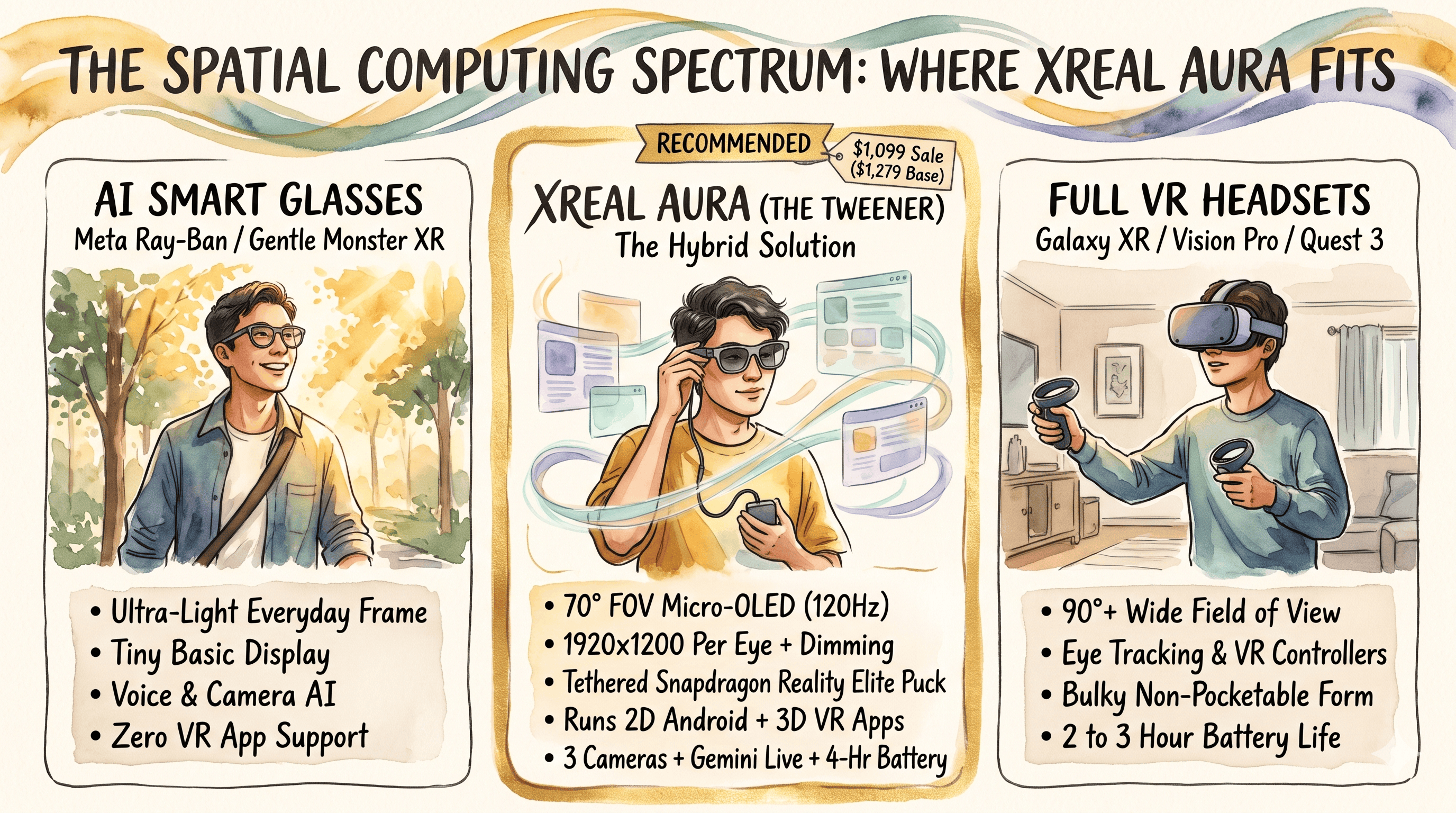
For years, wearable computing forced buyers into an uncomfortable binary choice. On one end sat bulky, ski-goggle-style mixed-reality headsets—such as Apple’s Vision Pro, Meta’s Quest 3, and Samsung’s Galaxy XR—capable of immersing users in full 3D worlds but far too heavy and cumbersome to slip into a daily commuter bag. On the other end sat featherweight AI smart glasses—like Meta’s Ray-Ban Displays and Google and Samsung’s upcoming collaborations with Warby Parker and Gentle Monster—which look like ordinary eyewear but limit visuals to tiny, basic heads-up notifications.
With the launch of the Xreal Aura, a close hardware-and-software collaboration between Google and Xreal, a third middle-ground category has officially emerged: "tweener" spatial glasses. Designed as a shrunk-down, travel-friendly interpretation of the Samsung Galaxy XR, the Aura pairs lightweight prism-display frames with a pocketable external compute puck running Android XR. Alongside upcoming entries like Meta’s next-generation VR Glasses, the Aura represents an ambitious attempt to shrink full spatial multitasking down to something you can pack in a carry-on pouch smaller than a Nintendo Switch 2 case.
Inside the Hardware Architecture: Birdbath Prisms, Three Cameras & a Compute Puck
Rather than cramming heavy batteries and silicon into the temples of the glasses themselves, the Xreal Aura splits its architecture across two tethered components linked by a USB-C cable:
- Twin 120Hz Micro-OLED "Birdbath" Optics: The frames project bright, sharp twin micro-OLED panels through flat prism lenses modeled after the Xreal One Pro line. While the optical stack makes the lenses noticeably thicker than standard prescription glasses, it delivers a crisp 1,920×1,200 resolution per eye at up to a 120Hz refresh rate—sharp enough for reading dense documents, watching movies, or gaming.
- 70-Degree Field of View & Electrochromic Dimming: Stretching out to a 70-degree field of view, the Aura comfortably outpaces Xreal’s One Pro (57 degrees) as well as Magic Leap and Snap Specs, creating the sensation of a large virtual monitor or cinema screen floating across the room. A dedicated arm button cycles the electrochromic lenses from transparent clear to nearly opaque black, while snap-in prescription lens inserts and three adjustable nosepad sizes tailor the fit.
- Three-Camera Spatial & AI Sensor Array: Unlike Xreal’s standard camera-free display glasses, the Aura integrates three outward-facing cameras—two mounted in the upper frame corners and one centered above the nose bridge. Together, they power room-scale spatial tracking, bare-hand gesture recognition, and real-time environmental vision for Gemini.
- Qualcomm Snapdragon Reality Elite Processor Puck: The tethered compute module runs full Android XR on a Qualcomm Snapdragon Reality Elite chip paired with either 256GB storage / 12GB RAM ($1,279 retail; $1,099 promotional launch price) or 512GB storage / 16GB RAM ($1,499 retail; $1,299 promotional price), with no microSD expansion slot. The puck also houses stereo arm speakers on the glasses, discrete volume rockers, a side power button with an integrated fingerprint reader, and a full-surface capacitive touchpad across its top shell.
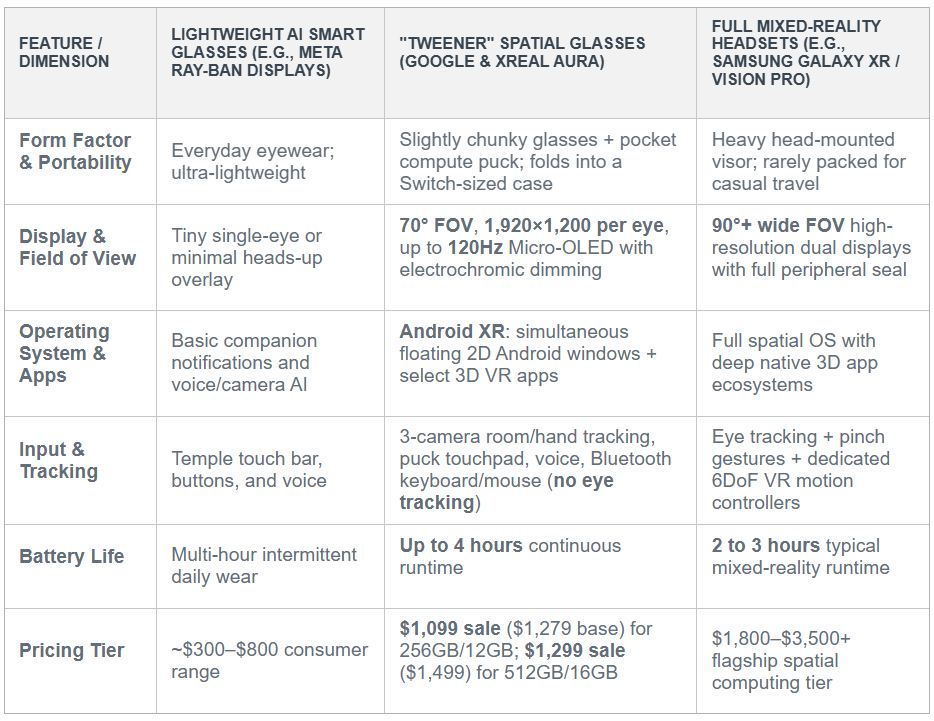
The Spatial Computing Spectrum: Where the Xreal Aura Fits
To understand why the Xreal Aura feels both revolutionary and compromised, it helps to compare its specifications and capabilities directly against lightweight AI glasses and full-size mixed-reality headsets:
Android XR in Practice: Floating Windows, VR Games & Sideloading
Because the processor puck runs Android XR, the Xreal Aura behaves like a multi-monitor spatial computer strapped to your face. Users can pin multiple 2D Android and Chrome browser windows around a room simultaneously—checking emails, drafting documents in Google Docs, and streaming live sports side by side.
Even more surprising is that the Aura runs genuine 3D virtual reality titles from the Google Play Store alongside sideloaded Android APKs and spatial Google AI Studio prototypes:
- Standout Spatial & VR Titles: Tabletop strategy games like Demeo, spatial puzzle games like Cubism, hand-puppet titles like Sock Puppet Superstar, immersive 3D documentaries (such as Galapagos), 360-degree YouTube videos, and 3D Immersive Google Maps all run sharply on the micro-OLED panels.
- The 70-Degree "Blinder" Trade-Off: While 70 degrees feels expansive for floating 2D monitors, fast-paced VR movement games expose the hardware's boundaries. In rhythm-fitness titles like Synth Riders, targets or hands drifting into peripheral vision vanish outside the clipped rectangular frame, reminding you that the Aura cannot fully match a 90-degree-plus VR headset.
- App Store Opt-Outs & Window Quirks: Major streaming services including Netflix and Disney Plus currently opt out of native Android XR app distribution—forcing users to load them inside the Chrome browser—while apps like Paramount Plus lock into fixed window dimensions that cannot be freely resized. Occasional video tearing during YouTube playback and minor spatial tracking drift also reflect the early, pre-polish state of the platform.
The Input & Ergonomic Bottleneck: Hand Tracking Without Eye Tracking
The single steepest learning curve on the Xreal Aura comes down to how you point, click, and type without dedicated VR motion controllers:
- Missing Eye Tracking: Flagship headsets like the Apple Vision Pro and Samsung Galaxy XR rely on eye tracking so users can simply look at an icon and pinch their fingers at waist level. Because the Aura lacks eye-tracking sensors, users must physically raise their hands into the upper camera cone and aim a virtual laser pointer like an airborne remote—causing arm fatigue and missed gestures whenever hands drop below the display's field of view.
- Inconsistent Puck Touchpad Performance: Using the top surface of the processor puck as a handheld touch remote or tabletop trackpad is an ingenious space-saving idea, yet cursor responsiveness fluctuates noticeably across apps, and the side fingerprint power button can be awkward to reach depending on your grip.
- Peripheral Friction Across Devices: Pairing Xreal’s folding wireless keyboard turns the Aura into a surprisingly capable portable writing station at a breakfast table or airplane tray. However, when cabling a MacBook or iPad Mini into the Aura as an external virtual monitor, OS input boundaries remain rigid: your laptop keyboard controls only your laptop, while the Aura keyboard controls only Android XR apps—forcing power users to juggle two keyboards side by side.
Multimodal Gemini Live & Circle to Search: An All-Seeing Spatial Assistant
Where the Xreal Aura genuinely leaps ahead of traditional display glasses is its deep integration with Gemini Live. Holding the top button on the glasses summons Google’s conversational AI, and tapping an upward-arrow screen-share toggle grants Gemini simultaneous visibility into both the real world through the front cameras and every virtual app window floating in your view.
In everyday use, that dual awareness creates a distinctly futuristic workflow: walking across a kitchen brewing coffee while a floating YouTube window hovers mid-air, asking Gemini to summarize what is playing on screen, or triggering Circle to Search with a pinch-and-hold gesture to identify a physical book in your hand or look up gameplay tips mid-session. While low-resolution camera feeds still struggle to read fine text from across a room and Gemini cannot yet execute deep multi-step actions inside every third-party app, having a context-aware visual assistant anchored in space hints strongly at where everyday mobile computing is heading.
Universal USB-C Device Bridging: MacBook, iPad Mini & Nintendo Switch 2
Beyond running standalone Android XR apps, the Aura doubles as a universal wearable display via DisplayPort-compatible USB-C cables (note that users must use a full-featured DisplayPort USB-C cable rather than the secondary charging-only cable included in the box):
- Laptops, Phones & Handhelds: Plugging in a MacBook, iPhone, iPad Mini, Steam Deck, or even a Nintendo Switch 2 (which switches into docked mode with Joy-Cons detached) projects a crisp floating external monitor right alongside native Android XR windows—allowing you to play The Legend of Zelda: Ocarina of Time on a giant virtual screen while asking Gemini live strategy questions.
- Standalone Glasses Mode: If you leave the processor puck behind, the Aura glasses still function independently when plugged directly into a laptop or phone, reverting to standard Xreal display-glasses firmware.
Battery Life, Thermal Venting & Buying Verdict
On endurance, the Xreal Aura outlasts almost every standalone VR headset on the market, delivering up to 4 hours of battery life compared to the typical 2-to-3-hour ceiling of conventional headsets. However, that endurance comes with an important thermal caveat: the Snapdragon Reality Elite puck relies on active cooling fans that exhaust noticeably warm air. Slipping the puck into a tight trouser pocket quickly triggers an overheating warning pop-up, making the included belt clip mandatory during mobile use.
At $1,099 on sale ($1,279 regular price), the Xreal Aura is clearly an early-adopter bridge rather than a mainstream replacement for either a smartphone or a dedicated VR headset. Between its cable clutter when connecting external consoles, uneven touchpad tracking, and narrow peripheral field of view in VR games, it demands patience. Yet for frequent travelers, remote workers, and spatial-computing enthusiasts who refuse to pack a bulky headset in their carry-on, the Aura offers the clearest, most portable glimpse yet of the day full multi-screen workspaces fold neatly into a pair of everyday glasses.