The Indian Computer Emergency Response Team (CERT-In) has published a critical security warning targeting desktop users of Google Chrome
What elevates this alert from routine patch management to urgent remediation is confirmed real-world abuse: one of the tracked flaws, CVE-2026-125350, is already being actively exploited in the wild
Inside the Six Core Vulnerability Classes Threatening Unpatched Builds
Modern web browsers act as full-scale operating environments—executing untrusted JavaScript, parsing structured XML feeds, rendering hardware-accelerated 3D graphics, and mediating file access. CERT-In’s technical breakdown identifies six distinct flaw categories spanning these core subsystems
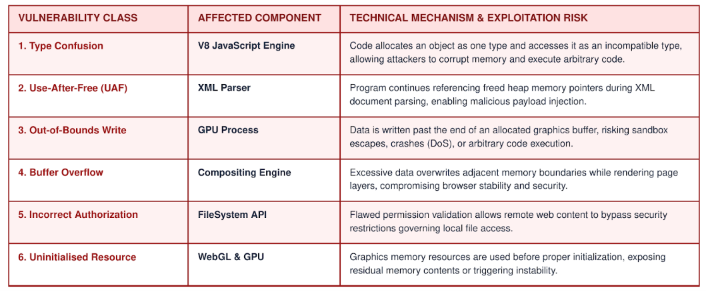
Figure 1. Technical breakdown of the six vulnerability classes highlighted in CERT-In's critical warning for Google Chrome
- Type Confusion in V8: Chrome’s V8 JavaScript and WebAssembly engine processes complex object structures at high speed; type confusion occurs when V8 allocates an object as one type and later reads it as an incompatible type, enabling attackers to corrupt heap memory and achieve remote code execution
- Use-After-Free (UAF) in XML: Memory pointers that continue referencing freed heap allocations during XML parsing allow crafted web pages to hijack control flow
- Out-of-Bounds Write in GPU & Uninitialised Resource Bugs in WebGL/GPU: Writing data beyond allocated graphics buffers or reading uninitialised GPU memory resources undermines process isolation and can destabilize or compromise the host system
- Buffer Overflow in Compositing: Memory boundary overwrites inside Chrome’s page-layer compositing pipeline expose users to arbitrary code execution and denial-of-service conditions
- Incorrect Authorization in FileSystem: Improper permission checks in the FileSystem component weaken sandbox safeguards designed to block unauthorized web access to local files
Affected Versions and Exact Patch Thresholds
CERT-In specifies that the vulnerabilities impact all desktop installations running older release channels
- Vulnerable Stable Channel Builds: Google Chrome versions prior to 157.0.8103.50
- Vulnerable Extended Stable Builds: Enterprise-managed Extended Stable versions prior to 156.0.8078.96
- Patched Windows & macOS Releases: Google has shipped Stable Channel version 157.0.8103.50/.51
- Patched Linux Release: Google has shipped Stable Channel version 157.0.8103.50
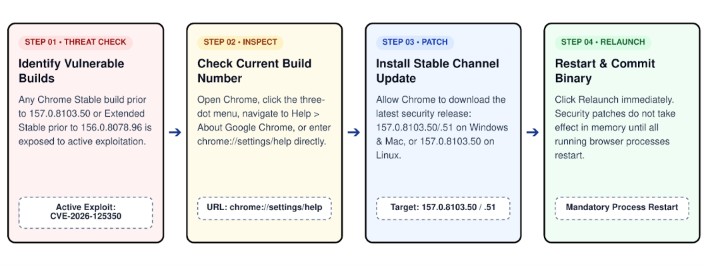
Figure 2. Official patch thresholds and verification steps based on CERT-In and Google Stable Channel release notes
How to Verify and Patch Your Browser Right Now
Because browser exploits frequently trigger the moment a user visits a compromised webpage or clicks a malicious link, waiting for background updates to finish on their own leaves endpoints exposed:
- Open the Version Inspector: Launch Chrome, select the three-dot menu in the upper-right corner, and click Help > About Google Chrome (or navigate directly to
chrome://settings/help). - Trigger the Update Check: Chrome will automatically query Google’s update servers and download build 157.0.8103.50 or 157.0.8103.51
- Click Relaunch Immediately: Downloading the patch does not protect an active session; the updated binary only loads into memory after all browser windows restart.
- Audit Chromium-Based Browsers & Enterprise Endpoints: IT administrators managing corporate fleets should verify policy-enforced auto-updates across Extended Stable (
156.0.8078.96or newer) and monitor Chromium-downstream browsers for upstream security backports