WhatsApp Scam Alert is moving from an engineering announcement into the hands of real users. The Meta-owned messaging app has started testing the feature with select Android beta users, adding a new security layer that can warn people when an incoming message from an unknown sender looks like a potential scam.
The interesting part is how WhatsApp is trying to solve the problem. Instead of sending your private message content to Meta for a server-side scan, Scam Alert uses an on-device machine learning model to examine messages from people who are not in your contacts and look for patterns associated with known scams. Meta says the message content does not leave the device for classification, and the detection is optional and user-controlled.
Think of it like adding a new defensive player to your WhatsApp squad. It does not take control of the game, it does not automatically block everyone who looks suspicious and it does not make the final decision for you. It simply raises a warning when the conversation starts looking like a familiar scam pattern.
What Is WhatsApp Scam Alert?
Scam Alert is an optional WhatsApp security feature designed to identify potentially fraudulent messages from non-contacts. It was first introduced by Meta as a limited beta in August 2026, and the feature has now started appearing for some Android beta testers in WhatsApp beta version 2.26.34.1.
When Scam Alert is enabled, WhatsApp downloads a machine-learning model to the user's smartphone. The model evaluates incoming messages from people who are not already in the user's contacts and looks for linguistic signals and conversational patterns associated with previously reported scams. If the model believes a message is likely to be fraudulent, WhatsApp displays a warning inside the conversation.
The feature is deliberately limited in what it does. The warning is shown to the recipient, while the sender does not see that their message has been flagged. The user then decides what happens next rather than WhatsApp automatically making the decision.
How WhatsApp Scam Alert Works
The process is relatively simple. First, the user has to enable Scam Alert manually. Once activated, the required machine-learning model is downloaded to the phone and starts checking messages from non-contacts for patterns associated with potential scams.
The model is not trying to understand every conversation or decide whether a person is trustworthy. Instead, it is looking for characteristics that can appear in known scam conversations, including the structure and language of suspicious messages. WhatsApp says the model was trained using patterns found in scam conversations that users had previously reported.
If the system thinks a message is likely to be a scam, the recipient sees a warning. From there, the user can block and report the sender, continue the conversation, or mark the chat as trusted when they believe the warning is incorrect.
That last option is important because no AI classifier is perfect. A legitimate message from an unfamiliar person can sometimes look similar to the beginning of a scam, especially when it contains links, urgent requests or unusual language.
Why WhatsApp Is Using On-Device AI
This is arguably the most important part of the feature.
WhatsApp uses end-to-end encryption for personal messages and calls, so the company cannot simply inspect the content of everyone's private conversations on its servers. The challenge is to add scam detection without turning encrypted messaging into a system where every private message is routinely uploaded for inspection.
WhatsApp's approach is to move the classification process onto the user's device. Meta says the message data and model stay on the device for this classification, and message content is not automatically sent to WhatsApp, Meta or another third party.
That creates a useful middle ground: the phone gets an AI-powered warning without requiring WhatsApp to read the conversation on a server.
Meta has also designed the feature with additional privacy safeguards around the anonymous performance data it collects. The company says only aggregate information about warnings and user actions is used for measurement, rather than raw conversation content.
What Happens When a Scam Is Detected?
Suppose an unknown person sends you a message saying you have won a prize, offering a suspicious investment opportunity or asking you to urgently transfer money.
Instead of simply showing the message like a normal chat, Scam Alert can display a warning if the on-device model thinks the conversation matches known scam patterns. The warning is visible only to you, giving you a chance to stop before continuing.
You can then block and report the sender, continue if you are confident the message is legitimate, or mark the chat as trusted if WhatsApp has made a mistake. If the user marks the conversation as trusted, WhatsApp says it can also offer the option to share the last five received messages to help improve the feature's accuracy. That sharing is not automatic; it requires the user's action.
This is an important distinction. Scam Alert is a warning system, not an automatic police officer inside your chat.
What Kind of WhatsApp Scams Is This Designed to Catch?
WhatsApp has been dealing with a wide range of scams, and modern fraud campaigns increasingly rely on social engineering rather than obvious malicious files.
Security researchers and Meta's own anti-scam work have highlighted patterns including fake job offers, impersonation, investment fraud, fake sales, romance scams, malicious links and urgent payment requests. These schemes often begin with an unfamiliar contact and gradually move the victim into a more private conversation where the scammer can create pressure and trust.
That makes the first message particularly valuable for detection.
If the system can recognise a suspicious pattern early, the user gets another chance to stop before clicking a link, sharing information or sending money.
WhatsApp Scam Alert Search Interest Is Rising
The timing of the beta rollout has also created a fresh wave of interest around WhatsApp Scam Alert, with searches increasingly focusing on terms such as “WhatsApp Scam Alert,” “WhatsApp Scam Alert Android,” “WhatsApp AI scam detection,” “WhatsApp scam warning,” “WhatsApp beta update” and “how to enable WhatsApp Scam Alert.”
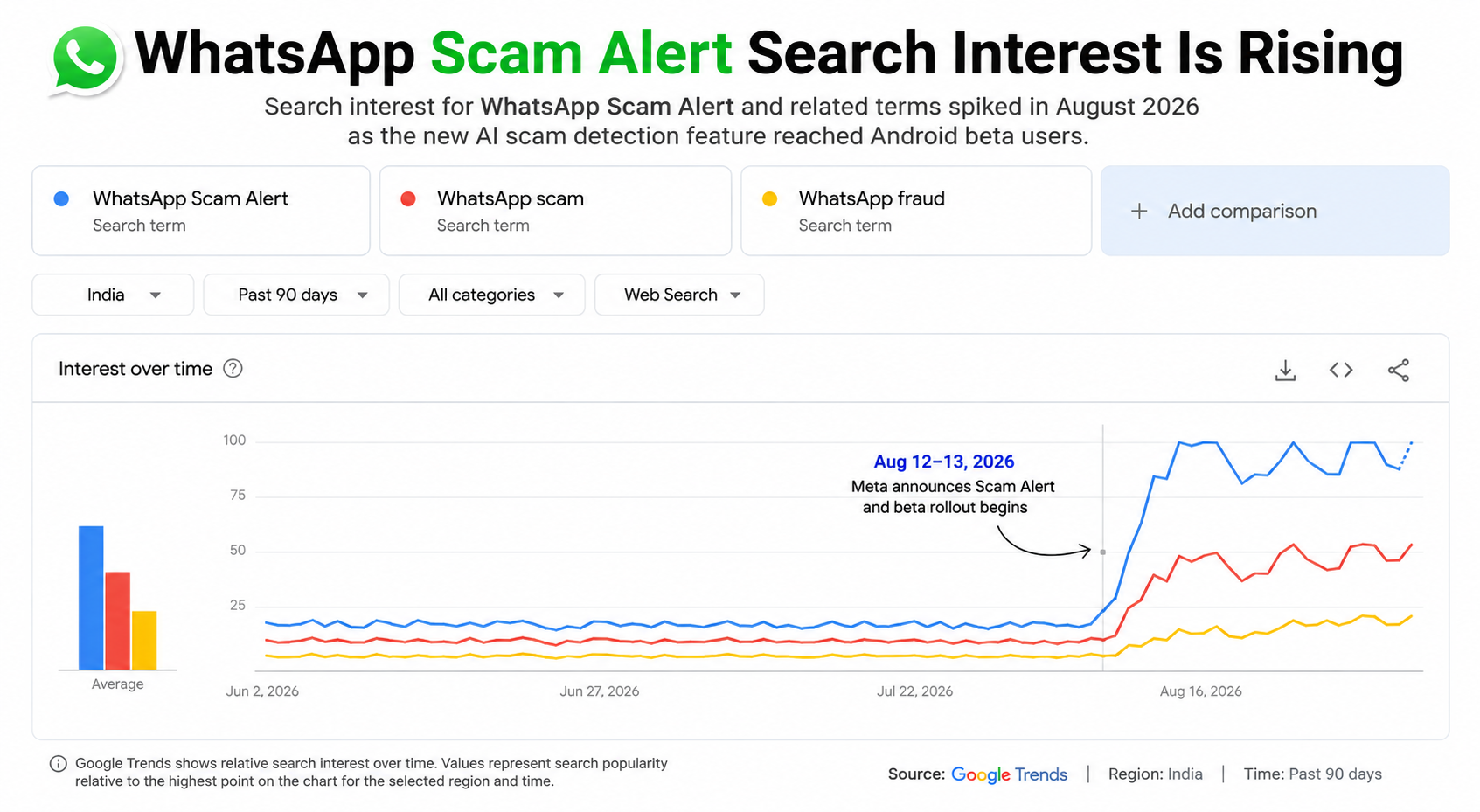
WhatsApp Scam Alert Is Now Reaching Android Beta Users
The latest development is more concrete than the original announcement.
On August 30–31, 2026, reports based on the WhatsApp Android beta began showing the Scam Alert control for select beta testers, particularly around version 2.26.34.1. The feature remains optional and is not enabled automatically.
That suggests WhatsApp has moved from describing the architecture to testing the actual user experience in a controlled environment.
But beta availability should not be confused with a public rollout.
WhatsApp has not announced a final release date for Scam Alert for all users. The current testing phase is an opportunity to evaluate accuracy, false positives, performance and user feedback before the feature is expanded more widely.
How to Enable WhatsApp Scam Alert
Because the feature is still in limited beta, there is an important catch: you may not have the option even if you are running the correct Android beta version.
For testers who have received the feature, reports indicate that the control appears under WhatsApp → Settings → Account, where Scam Alert can be switched on manually.
Once enabled, the phone downloads the required machine-learning model. Users should not install unofficial APKs claiming to “unlock” Scam Alert, because doing so can introduce security risks that completely defeat the purpose of the feature.
The safest approach is to use an official WhatsApp beta build and wait for the feature to become available to your account.
Does Scam Alert Break WhatsApp End-to-End Encryption?
According to Meta's published technical design, no.
WhatsApp says scam classification happens on the device, with neither the message content nor the fact that a message was detected as a scam automatically sent to WhatsApp or Meta. This design is intended to add scam detection while preserving the core privacy guarantees of encrypted messaging.
The company has also built the system so that any sharing of message content happens only after a user takes an explicit action. For example, after marking a conversation as trusted, the user can choose to share the last five received messages to help improve the model.
That distinction matters because AI-powered security does not automatically require server-side access to private messages.
What If Scam Alert Gets It Wrong?
False positives are always a possibility with automated detection.
A legitimate message from an unknown person can contain the same features that often appear in fraudulent conversations. A recruiter contacting you for the first time, a seller you have never spoken to, or someone sharing a payment link could potentially look suspicious to a pattern-based system.
WhatsApp therefore does not automatically block every message that triggers the model. The recipient gets a warning and remains in control. They can continue the conversation or mark the chat as trusted.
That is a sensible design choice.
An AI warning should help you slow down, not make decisions for you.
WhatsApp Already Has Other Anti-Scam Protections
Scam Alert is not WhatsApp's first attempt to fight fraud.
Meta has already introduced device-linking warnings that can alert users when behavioural signals suggest someone may be trying to trick them into linking another device to their WhatsApp account. Scammers have used fake voting pages, QR codes and requests for linking codes as part of account-takeover attempts.
In August 2026, Meta also announced stronger two-step verification, more information about calls from unknown numbers on Android and expanded support for passkeys. WhatsApp says more than one billion people have already set up a passkey, and users can now add more than one passkey when using both Android and iOS devices.
Together, these tools show where WhatsApp's security strategy is heading: not one giant filter, but multiple layers that try to stop scams at different points.
What WhatsApp Users Should Still Do
Scam Alert is useful, but it should not become an excuse to switch off common sense.
Never share your WhatsApp registration code, two-step verification password or other authentication information with someone who contacts you unexpectedly. WhatsApp's Help Center also recommends enabling two-step verification, checking linked devices regularly and being cautious with suspicious messages and emails.
The same rule applies to unexpected links, investment offers, job opportunities and urgent payment requests.
If the message creates panic and demands immediate action, treat that urgency as part of the threat model.
Pause. Verify. Then decide.
Is WhatsApp Scam Alert the Future of Messaging Security?
It could become an important model for how encrypted apps handle safety.
The obvious conflict has always been simple: messaging platforms want to detect scams, but encrypted services should not need to read everyone's private conversations in order to do it.
WhatsApp is testing whether on-device AI can provide useful security warnings while the conversation itself remains protected. The technical design is deliberately small and focused, which makes on-device classification practical even on smartphones without relying on a constant server-side AI connection.
If the system proves accurate enough, the approach could become much more important.
Messaging apps could increasingly move certain safety checks onto the device rather than asking users to trade privacy for protection.
WhatsApp Scam Alert: Final Takeaway
The new WhatsApp Scam Alert feature is not a magical shield against every scam, and it is not yet available to everyone. It is currently a limited beta test, with the latest reports showing the optional feature reaching select Android beta users.
What makes the feature genuinely interesting is the architecture behind it. WhatsApp is using on-device machine learning to identify suspicious messages from non-contacts without automatically sending message content to Meta for classification.
That gives users another layer of defence without turning every encrypted conversation into a server-side scanning exercise.
For now, the best strategy is to treat Scam Alert as a new warning system, not a replacement for judgement. A warning can give you another chance to stop before you enter the scammer's game, but you still control the final move.
Frequently Asked Questions
What is WhatsApp Scam Alert?
WhatsApp Scam Alert is an optional security feature that uses an on-device machine-learning model to identify potentially fraudulent messages from people who are not in your contacts.
Is WhatsApp Scam Alert available to everyone?
No. It is currently in a limited beta rollout, with the feature appearing for select Android beta users. WhatsApp has not announced a general public release date yet.
Which Android version has WhatsApp Scam Alert?
Recent reports show the feature appearing in WhatsApp Android beta version 2.26.34.1 for some testers. Availability is controlled by WhatsApp, so installing that version alone does not guarantee access.
Does WhatsApp Scam Alert read my private chats?
Meta says the Scam Alert classification happens on the device and that message content does not automatically leave the device for classification.
Can WhatsApp automatically report a message when Scam Alert detects a scam?
No. Meta says detection does not automatically report the message. The user decides whether to block, report or continue the conversation.
Can I turn WhatsApp Scam Alert off?
Yes. It is designed as an optional, user-controlled feature and can be switched on or off.
Where can I find WhatsApp Scam Alert?
For beta users who have received the feature, current reports indicate that the option appears under Settings → Account.
What scams can WhatsApp Scam Alert detect?
The system is designed to identify conversational patterns associated with scams reported to WhatsApp. These can include suspicious requests, impersonation attempts, malicious links, fake offers and other common fraud patterns, although WhatsApp does not claim that the system catches every scam.
What should I do if WhatsApp warns me about a scam?
Stop before taking the requested action. Do not send money or verification codes, do not click suspicious links and do not share sensitive information. Verify the sender independently, then block and report the account when appropriate. WhatsApp provides built-in blocking and reporting tools.
Is WhatsApp Scam Alert powered by AI?
Yes. It uses an on-device machine-learning model that classifies messages based on linguistic signals and conversational structure associated with known scam patterns.
Does Scam Alert replace WhatsApp's other security features?
No. It is another layer in WhatsApp's broader security system. Existing protections include two-step verification, passkeys, device-linking warnings and other anti-scam measures.