Imagine changing colleges and needing to collect marksheets, certificates and academic records from different institutions. Now imagine having a digital academic identity designed to help organise those records in one place. That is the idea behind APAAR ID, the government's One Nation, One Student ID initiative.
APAAR stands for Automated Permanent Academic Account Registry. It provides students with a unique 12-digit identification number linked to their academic records. The system aims to make it easier to manage educational achievements and support processes such as admissions, credit transfers and academic verification.
For school and college students, understanding APAAR is useful—not only because of its digital features, but also because students and parents should know how the ID is created, what information is involved and where to get help if something goes wrong.
What Is APAAR ID?
APAAR is a government initiative designed to create a continuous digital record of a student's academic journey. Its goal is to help students keep track of educational achievements as they move between schools, colleges and other learning opportunities.
The record may include academic credits, marksheets, grades, degrees, diplomas and other recognised achievements. APAAR is connected with the Academic Bank of Credits (ABC) and DigiLocker, which help students access and manage digital academic documents.
The idea is to reduce the difficulty of handling records spread across different institutions. Instead of treating every stage of education as a separate set of documents, APAAR aims to support a more connected academic history.
Official source: APAAR — About the Initiative.
How Can APAAR ID Help Students?
APAAR is intended to make academic records easier to manage and verify. Its benefits may become particularly relevant when students change institutions, apply for further education or need to provide proof of their qualifications.
Key uses include:
- Academic records: Helping students access their academic achievements digitally.
- Credit transfers: Supporting the accumulation and transfer of eligible academic credits through the Academic Bank of Credits.
- Admissions and verification: Helping institutions verify academic information for relevant processes.
- Further learning: Supporting students as they move between educational levels or pursue additional qualifications.
- Digital document access: Connecting academic records with DigiLocker for convenient access to issued documents.
These features are designed to make academic administration more organised. However, students should still follow the requirements of their school, college, university or admissions authority. APAAR does not automatically guarantee admission, credit acceptance or eligibility for a particular course.
APAAR ID vs ABC ID vs DigiLocker: What Is the Difference?
These three names are related, but they do not mean exactly the same thing.
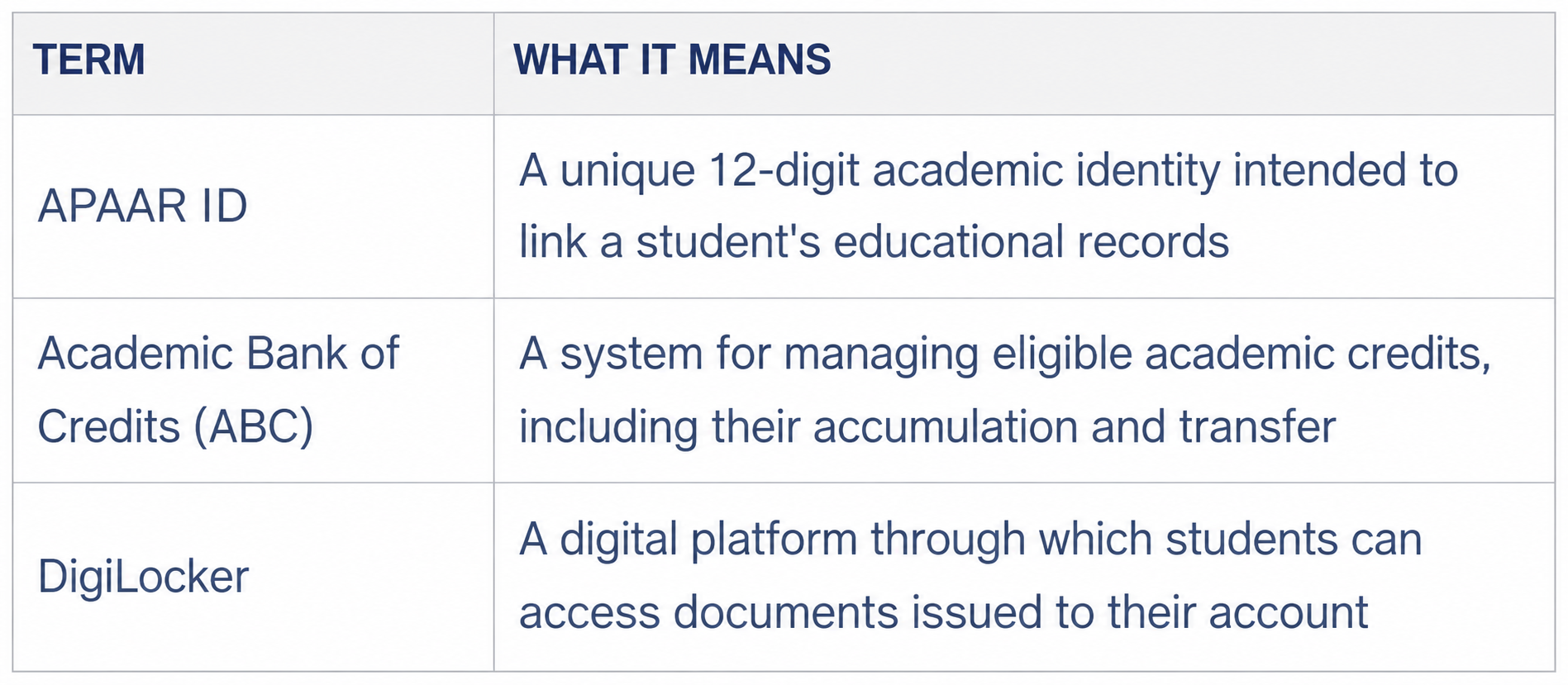
In simple terms, APAAR is the academic identity, ABC supports academic-credit management, and DigiLocker provides access to digital documents. They work together within the broader digital education system.
Students can read more on the official APAAR website and the Academic Bank of Credits portal.
How to Get an APAAR ID
The process depends on whether the student is in school or higher education. The official APAAR guidance describes school-based verification and ID creation, including the role of parents or guardians for minors.
For school students, the general process is:
- Check your details: Ask the school to verify your personal information in its student records.
- Complete consent requirements: Parents or guardians must provide the required consent when the student is a minor.
- Verify your identity: The school follows the prescribed authentication process.
- ID generation: Once the information is verified, the APAAR ID can be generated.
- Check DigiLocker: The generated ID is made available through the student's DigiLocker account.
Students should follow the instructions given by their school or institution. Do not assume that every student must follow an identical process, particularly where higher-education records or institutional systems are involved.
For step-by-step guidance, visit the official APAAR FAQs.
What If Your APAAR ID Is Not Generated?
One issue highlighted in the official FAQs is a mismatch between the student's details in academic records and Aadhaar information. Differences in names or other personal details can prevent successful ID generation.
- If your ID has not been generated, check the following:
- Your name matches across the relevant academic records and Aadhaar.
- Your school has the required student identifier, known as the Permanent Education Number (PEN), where applicable.
- The institution has completed the required verification steps.
- Any errors in the records have been corrected through the appropriate authority.
If the problem continues, contact your school or institution first. You can also use the official APAAR support page, which lists help resources and a toll-free number: 1800-889-3511.
Avoid sharing identity documents or personal information with unofficial agents who promise to generate an APAAR ID for a fee.
Privacy and Consent: What Students and Parents Should Understand
Digital academic records can make verification easier, but personal information must be handled carefully. Students and parents should understand what information is requested, why it is needed and which official process is being followed.
For school students who are minors, the official APAAR process includes parental consent. The APAAR website also publishes a privacy policy explaining how personal information may be collected and processed.
Before submitting details, use the official website or your institution's authorised process. Never share OTPs, passwords or account credentials with strangers, and do not post your APAAR ID or identity documents publicly without a valid reason.
Students and parents can review the APAAR Privacy Policy and official consent resources to understand the process.
What Should Students Do Now?
If you are a school student, ask your school whether your APAAR ID has been generated and whether your details are correct. Parents should review the consent process and help resolve any mismatch in records.
If you are in college, check your institution's instructions for academic-credit records and the Academic Bank of Credits. Keep access to your DigiLocker account secure and confirm that relevant documents are available when you need them.
The most important step is to use official sources. APAAR is intended to make academic records easier to manage, but students should understand the process rather than assuming that every record will appear automatically.
Knowledge Corner: Important Terms Explained
- APAAR: Automated Permanent Academic Account Registry, a system intended to provide students with a unique academic identity.
- ABC: Academic Bank of Credits, which supports the management and transfer of eligible academic credits.
- DigiLocker: A digital platform for accessing documents issued to a user's account.
- PEN: Permanent Education Number, a student identifier used in the school education system and required for APAAR generation under the official guidance.
- Academic credit: A unit used to represent learning completed under an eligible course or programme. Credit acceptance and transfer depend on applicable academic rules.
Frequently Asked Questions
Is APAAR ID the same as Aadhaar?
No. APAAR is an academic identity, while Aadhaar is an identity system. Aadhaar information is used in the prescribed verification process, but the two serve different purposes.
Is APAAR ID useful for college students?
It can help with managing academic records and supporting credit-related processes. Students should check their institution's instructions to understand how APAAR and ABC are used for their programme.
Can parents help a child get an APAAR ID?
Yes. The official school process includes parental consent for minors, along with verification through the school.
What should I do if my APAAR ID generation fails?
Ask your school or institution to check your records and the status of the request. Correct any mismatch in personal details through the appropriate authority, then follow the official process again.
Where can I get official help?
Visit the APAAR website or its contact and support page.