For decades, the web has worked around one basic assumption: a human is sitting in front of the browser and making the decisions. We search, open pages, click buttons, fill forms, compare products and complete transactions. But that assumption is beginning to change. In 2026, Google, Microsoft, OpenAI and Cloudflare are all working on systems that allow AI to understand webpages and perform actions inside them. Google has integrated Gemini Spark with Chrome for web errands, Microsoft has introduced Browse with Copilot in Edge, OpenAI provides browser-based computer use for agents, and Cloudflare has built Kitesurf, a browser designed specifically around AI workloads. Pasted markdown
This is more than adding a chatbot to the browser. The important shift is that AI is moving from reading the web to acting on it. An agent can be given a goal, navigate websites, gather information, interact with interfaces and complete multiple steps. That changes the role of the browser itself—and it could eventually change how websites are designed, secured and discovered.
From AI Assistant to Agentic Browser
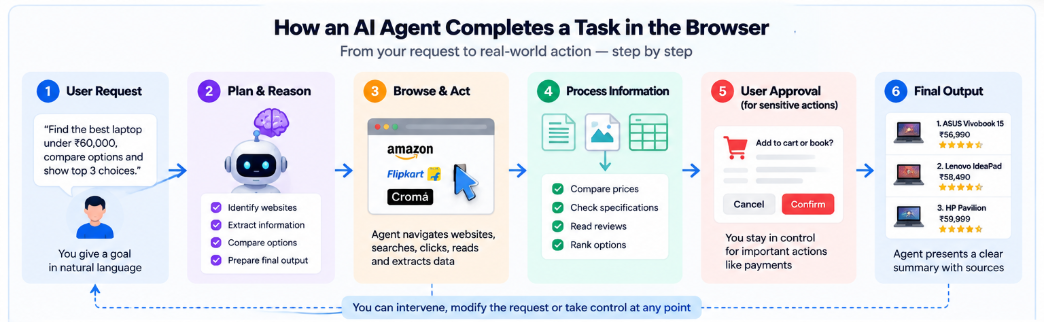
The first wave of browser AI focused mainly on understanding information. An assistant could summarize an article, explain a webpage or compare content across tabs. That model is now evolving toward what is commonly called an agentic browser: a system where AI can actively navigate websites and perform tasks rather than simply describe what the user should do.
Google's Gemini Spark is a clear example. In July 2026, Google announced Chrome integration that allows Spark, with user permission, to handle tasks such as researching flights or scheduling apartment viewings. Google says sensitive steps such as payments can be handed back to the user, while the system also includes protections against threats such as prompt injection. Google has also expanded Gemini Spark to Google AI Pro subscribers in India, describing it as a cloud-based personal agent capable of working in the background.
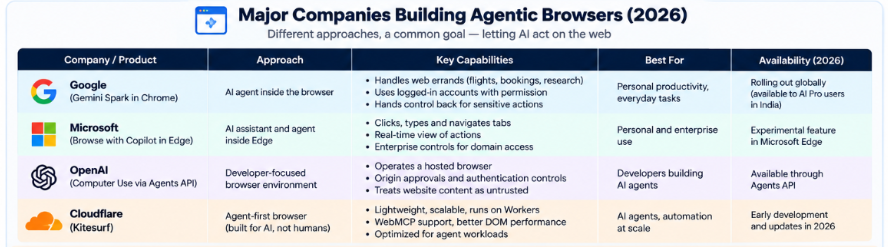
Microsoft is taking a similar approach with Browse with Copilot in Edge. Copilot can click, type, scroll and navigate webpages on the user's behalf, while the user can watch the activity and take control at any time. Microsoft also warns that the feature is experimental and can be affected by malicious instructions hidden inside webpages, reinforcing that agentic browsing is not simply a convenience feature—it is a new security environment.
OpenAI is approaching the problem from the developer side. Its Agents API provides a hosted browser environment where an agent can navigate websites and interact with browser interfaces to perform tasks such as research, testing and application workflows. OpenAI's documentation requires applications to handle website-origin approvals and authentication and explicitly states that website content should be treated as untrusted.
Why Cloudflare Is Building a Browser for AI
The most unusual development may be Cloudflare's Kitesurf. Rather than taking a conventional browser and placing an AI assistant on top of it, Cloudflare designed Kitesurf specifically for agents. The company argues that browsers such as Chromium carry significant features and overhead intended for human users—visual rendering, themes, tabs and other elements that are far less important to an AI system.
For an agent, Cloudflare says the priorities are different: lower resource consumption, scalability, performance, access to structured content and lower operating cost. Kitesurf runs on Cloudflare Workers and is designed around agent workloads such as screenshots and HTML extraction. In September, Cloudflare announced another update adding WebMCP support, improved DOM performance and terminal-based rendering.
That idea points to a larger architectural change. The browser of the future may not necessarily be a single product that humans use to browse faster. It could become infrastructure that AI agents use to interact with the web at scale.
The Next Step: Websites Designed for Agents
Browser automation is only one part of the story. A bigger question is whether websites themselves will start exposing interfaces specifically for AI agents.
This is where WebMCP becomes interesting. Instead of forcing an AI to visually inspect a webpage and imitate a human clicking buttons, a website could expose clearly defined actions that an agent can discover and call. Cloudflare's current experimental work connects server-side MCP tools with browser-side capabilities, creating a more direct bridge between websites and agents. Cloudflare describes this as part of a broader move toward an “Agentic Internet,” although the technology and standards are still developing.
Think about an airline website. Today, an AI agent may have to search the page, identify filters, click dates, read fare rules and navigate through several screens. A more agent-ready website could explicitly expose actions such as finding flights, comparing fare rules or checking availability. The human-facing website would still exist, but the same service would also provide a structured interface for authorized machine interaction.
That distinction matters because agent-friendly web design is not simply better scraping. It is a move toward websites that intentionally explain what actions are available, what information those actions require and what permissions are needed to execute them.
The Biggest Problem Is Security
Once AI can act through a browser, a webpage is no longer just information. It can also become an input to the AI's decision-making process.
Consider a simple example: a user asks an AI agent to compare products. The agent visits a page containing hidden text that attempts to instruct it to ignore the user's request and perform another action. A conventional browser may simply display or ignore that content. An AI agent could potentially interpret it as an instruction. This is the basic idea behind indirect prompt injection.
Google has highlighted indirect prompt injection as a serious threat to agentic browsing, while Microsoft warns that hidden webpage instructions can cause browsing agents to perform unintended actions. OpenAI similarly instructs developers to treat website content as untrusted and use explicit controls around website access.
There is also a broader concept known as excessive agency. OWASP describes this as a situation where an AI system has too much functionality, too many permissions or too much autonomy, allowing unexpected model behavior or malicious input to result in damaging actions.
That means the future of agentic browsing will depend on more than model intelligence. It will require permission systems, approval gates, origin restrictions, sandboxing, authentication controls and careful monitoring. The goal is not to make an agent capable of doing everything. It is to make it capable of doing only what it is authorized to do.
What Agentic Browsing Means for Web Developers
The rise of AI agents could create a new layer of web development.
Traditional frontend engineering focuses on how humans interact with a page: navigation, layout, accessibility, responsiveness and visual clarity. Those things are not disappearing. But developers may increasingly need to think about whether an AI system can understand the site's structure and safely perform its available actions.
This creates a new question alongside traditional SEO: can an AI agent discover, understand and correctly use the capabilities of this website?
Clear semantic structures, predictable actions, machine-readable data and well-defined permissions may become increasingly valuable. A button labelled “Continue” might make perfect sense visually, but a clearly defined action with an explicit purpose is easier for an agent to reason about. The broader shift is from designing websites only for human interaction toward designing digital services for human and machine interaction together.
Knowledge Corner
Agentic Browser: A browser or browser environment in which AI can navigate webpages and perform actions such as clicking, typing, scrolling and interacting with applications.
Computer Use: A capability that allows an AI model or agent to operate browser or desktop interfaces. OpenAI's current tooling is one example.
WebMCP: An emerging approach for allowing websites to expose tools that AI systems can discover and invoke. Current implementations remain experimental.
Indirect Prompt Injection: An attack where malicious instructions are embedded in external content, such as webpages or documents, and encountered by an AI while it is completing an otherwise legitimate task.
What Should Students and Developers Do Now?
This is becoming a practical area to explore, especially for developers working with AI agents. Instead of building another basic chatbot, a much stronger portfolio project would be a web research agent that can receive a task, browse several trusted websites, extract structured information, verify the original source and produce a report while keeping a record of the actions it took.
Tools such as Playwright can help with browser automation, while MCP-based approaches can be used to explore how agents interact with external tools and structured capabilities. The most important lesson is to build these systems with boundaries from the beginning: restrict available tools, log actions, require approval for consequential operations and deliberately test how the agent behaves when a webpage contains misleading instructions. The objective should be controlled automation, not unrestricted autonomy.
The Browser's Next Job Is Not Just to Show the Web
The most important change happening in browsers is therefore not another interface redesign. It is a change in who is expected to use the web.
Google is allowing Gemini to perform browser-based errands. Microsoft is allowing Copilot to navigate Edge. OpenAI is providing developers with browser computer-use infrastructure. Cloudflare is experimenting with a browser designed specifically for agents and with ways for websites to expose machine-readable capabilities.
The result could be a web where humans remain the decision-makers but AI handles more of the intermediate work. Instead of manually moving from search result to webpage to form to confirmation screen, users may increasingly describe the outcome they want and let an agent handle the repetitive steps under a defined permission system.
That is why agentic browsing matters. The browser is beginning to evolve from a tool that helps people visit the internet into infrastructure that helps people—and increasingly AI agents—act on the internet.
The question for the next generation of developers may no longer be only, “How do I build a better website?” It may be: “How should my website behave when an AI agent becomes one of its users?”
Trusted Sources
Google — Gemini Spark and Chrome Google Blog
Microsoft — Browse with Copilot in Edge Microsoft Support
OpenAI — Computer Use OpenAI Developers
Cloudflare — Kitesurf Cloudflare Blog
Cloudflare — Kitesurf Update & WebMCP Cloudflare Blog
OWASP — Excessive Agency