You open an AI chatbot, type something you would never post on social media, and hit send. It feels like a private conversation. But what if it is not?
That is becoming one of the biggest questions around generative AI.
People are increasingly using chatbots as sounding boards for personal problems, health questions, money decisions, relationship issues and difficult conversations. A recent DuckDuckGo survey found that 1 in 3 AI users said they had told a chatbot something they kept from trusted people in their lives, while the figure rose to 56% among self-described AI enthusiasts.
The uncomfortable part is that many users still think of those chats as private.
They should not assume that.
Your AI Chat Is Not a Private Diary
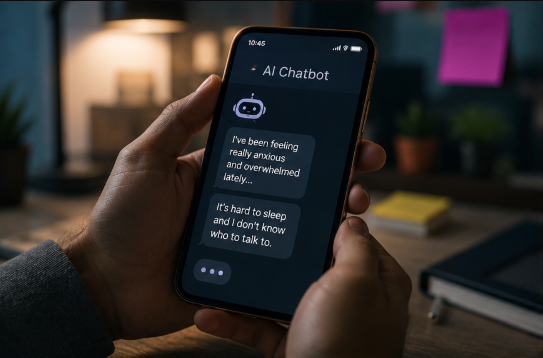
Think of an AI chatbot like a powerful game server rather than a notebook stored under your bed. You can type whatever you want into it, but the conversation exists inside a larger technical and legal system with storage, security controls, retention policies and access rules.
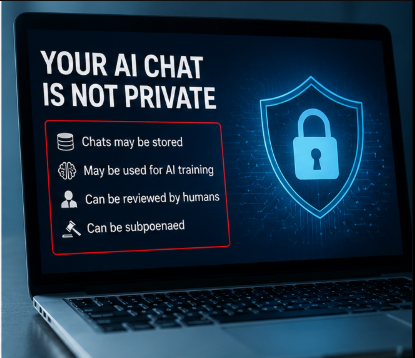
CNET's reporting on the DuckDuckGo survey found that many users did not understand how their conversations could be stored, reviewed, used or disclosed. 75% of respondents were unaware that chatbot conversations could be subpoenaed, while 53% did not know that chatbot conversations could be used for AI training by default.
That gap between how private a conversation feels and how the system actually handles it is the real privacy problem.
What People Are Telling AI
The problem is not that people are using AI for help.
The problem is how quickly the chatbot can become a digital confidant.
According to the survey, people reported sharing information with AI that they did not share with friends, family or even medical professionals. Parents were another striking example: 43% of surveyed parents said they revealed things to AI that they did not tell the people they trusted most, including their children.
Past reporting has also shown people turning to chatbots for sensitive questions involving physical and mental health, financial decisions, parenting and relationship problems.
That creates a dangerous assumption:
“The chatbot knows this because I told it, but nobody else can see it.”
That second part may not always be true.
What Happens to the Information You Share?
AI companies can have different policies, settings and retention periods, so there is no single rule for every chatbot.
But users should understand that conversations can be stored and processed. CNET notes that unless users opt out where that option exists, some chatbot systems can retain conversations for purposes including model improvement and training. It also points to past incidents in which chatbot transcripts became publicly discoverable through search engines.
The broader lesson is simple: typing something into an AI system does not make that information disappear after the answer appears.
Current official documentation reinforces why checking settings matters. Google says Gemini Apps activity can be saved to a user's account when Keep Activity is enabled, while users can review or delete activity and change whether their data is used to improve Google AI.
OpenAI similarly provides Data Controls that let users choose whether conversations help improve its models, while Temporary Chat is designed not to appear in history or be used for model improvement.
The point is not that every chatbot uses your data in exactly the same way.
The point is that you need to know the rules of the particular AI service you are using.
Could Your AI Chats End Up in Court?
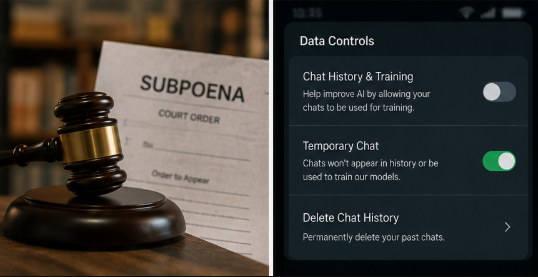
This is one of the least understood parts of AI privacy.
CNET's reporting says only 25% of DuckDuckGo survey respondents knew that companies operating major AI models could be legally required to provide chatbot data when served with a subpoena.
That does not mean police can casually open anyone's chatbot history whenever they want. Legal access depends on the applicable law and legal process.
But the broader principle matters: a commercial AI conversation is not automatically protected by the same confidentiality rules as a conversation with a lawyer, doctor or therapist.
That distinction becomes especially important when users discuss allegations, financial activity, workplace incidents or other highly sensitive matters.
Your Employer May Also Have Access
Workplace AI creates another layer of risk.
CNET points out that employees using AI through company-managed accounts may have their conversations accessible to their employers under certain circumstances. The same problem applies when workers paste confidential company information into personal AI accounts.
This is already becoming a serious workplace habit.
The temptation is obvious: copy an internal document into an AI tool, ask it to summarise the document, and move on.
The problem is that convenience can quietly turn into a data-leak event.
Company strategy, customer records, source code, internal financial information, unreleased product plans and credentials should not be pasted into a personal chatbot simply because the chatbot is useful.
Your company's AI policy matters here, and so does the provider's data policy.
AI Training: Does Your Chat Help Improve the Model?
This is another area where users often misunderstand what happens behind the scenes.
AI training is the process of using data to help improve models so they can recognise patterns, generate responses and perform tasks more effectively. The data used in AI systems can come from many sources, including published material and, depending on the service and settings, user interactions.
DuckDuckGo's survey found that more than half of respondents either did not know or were unsure whether their chatbot conversations were used for AI training. Nearly three in five said they were uncomfortable with that possibility.
That does not mean every chatbot automatically trains on every conversation.
It means users should stop assuming that they know what happens to their data without checking the provider's current settings and privacy documentation.
AI Memory Makes the Problem More Interesting
The next step is not just chat history.
Many modern AI assistants can remember information about users across conversations or use previous interactions to provide more personalised responses. That can be useful because you do not have to repeat your preferences, projects or recurring tasks.
But memory creates another question:
What exactly does the AI remember about me?
OpenAI's current documentation says Memory is optional and lets users review, edit or delete saved memories, while Google's Gemini documentation provides controls for reviewing and deleting activity and changing retention settings.
That means privacy is no longer only about the message you just sent.
It can also involve the profile the system builds from repeated interactions.
Can AI Accidentally Reveal Private Information?
There is another technical risk: data leakage.
CNET cites research from Wake Forest University suggesting that AI agents performing autonomous tasks can sometimes leak data, either intentionally or unintentionally. It also highlights the broader concern of data memorization, where models can potentially reproduce information associated with previous inputs.
These risks are not the same as saying an AI model will simply publish everything you type.
They are a reminder that AI systems are complicated software systems, and complicated systems can introduce unexpected privacy problems.
For users, the practical answer is not panic.
It is data minimisation.
The Golden Rule: Don't Give AI Anything You Would Hate to See Exposed
This is the easiest privacy rule to remember.
Before sending sensitive information to an AI system, ask:
“Would I be comfortable if this appeared in the wrong place?”
If the answer is no, do not paste it.
That applies to:
- Passwords and authentication codes
- Bank or payment information
- Government identification numbers
- Private medical records
- Confidential legal documents
- Company secrets
- Unreleased product information
- Customer data
- Personal information about someone else
You can usually get the same useful answer by removing identifying information first.
Instead of:
“Here is my full medical report. Tell me what this means.”
Use:
“Here is an anonymised description of these symptoms. What general possibilities should I discuss with a doctor?”
You are still using AI.
But you are reducing unnecessary exposure.
How to Use AI More Privately
The safest approach is to combine better habits with the privacy controls already offered by the service.
First, check your chatbot's data settings. On ChatGPT, users can turn off “Improve the model for everyone” through Data Controls, while Temporary Chat is available for conversations that should not appear in history or be used to improve models.
With Gemini, Google says users can review and delete Gemini activity, turn off Keep Activity, and change auto-delete settings. Temporary chats are retained for 72 hours for limited purposes and are not used to train Google's AI models while they remain temporary.
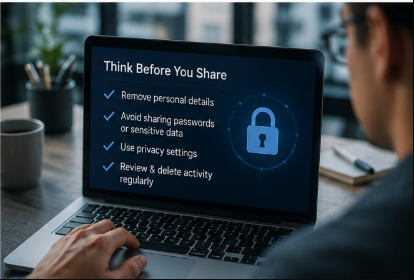
Second, minimise what you provide. Strip out names, addresses, account numbers, phone numbers, passwords and other information that is not necessary for the question.
Third, check what the AI remembers. A useful privacy habit is occasionally reviewing stored activity, memories and connected-app permissions.
And fourth, treat AI tools connected to your workplace, browser, email or other applications with even more caution.
What About AI Chatbots That Run Locally?
There is another option for people who need stronger privacy: local or offline AI.
Some AI assistants can run models directly on your computer rather than sending every interaction to a cloud service. CNET mentions tools such as Jan.ai, Ollama, LM Studio, PrivateGPT and GPT4All as examples of systems that can be run locally.
Local AI is not automatically private in every situation—your computer still needs security, and the software itself may have telemetry or other features that should be checked—but processing data locally can reduce dependence on cloud-based storage.
For people handling highly sensitive material, that distinction can matter.
Is AI Actually Bad for Privacy?
No.
That would be the wrong conclusion.
AI can be incredibly useful for learning, coding, writing, research, brainstorming and accessibility. The privacy problem comes from assuming convenience equals confidentiality.
The technology does not need to be treated like an enemy.
It needs to be treated like any other digital service where you understand what data you are giving away, what the provider says it does with that data and what controls you have.
The more powerful the assistant becomes, the more important that discipline gets.
What Should You Do Now?
Take five minutes and check the AI tools you use most.
Look at data controls, chat history, memory, activity retention, connected apps and model-training settings. Google and OpenAI both provide current controls for managing these areas, although the exact options differ by service.
Then clean up your own behaviour.
Stop putting secrets into chatbots just because the interface feels personal. Remove identifying details when they are not needed, avoid uploading confidential documents unnecessarily and use temporary or privacy-focused modes for sensitive but legitimate tasks.
The objective is not to stop using AI.
It is to make sure you are the one deciding what the AI gets to know about you.
AI Privacy: Frequently Asked Questions
Are AI chatbot conversations private?
Not automatically. Privacy depends on the service, account type, settings, retention policies and applicable laws. Users should read the current privacy documentation for the specific chatbot they use.
Can AI companies use my chats to train their models?
Some services allow conversations to be used for model improvement depending on the product and settings. For example, OpenAI provides a control for opting conversations out of model improvement, while Google provides controls around Gemini activity and whether data is used to improve Google AI.
Can police or courts access AI chatbot conversations?
Potentially, when the provider is legally required to provide data through appropriate legal process. CNET's reporting highlights that awareness of this possibility is surprisingly low among users.
Can my employer see my AI chats?
It can depend on the account and how the service is provided. CNET notes that employer access can be possible when workers use company-managed AI systems or accounts under certain circumstances.
Should I share passwords with AI?
No. There is virtually no good reason to paste passwords, authentication codes or other credentials into a general-purpose chatbot.
Can I use AI for sensitive questions?
Yes, but minimise the information you provide. Remove names and identifying details wherever possible, check the service's privacy controls and avoid uploading confidential records unnecessarily.
Is Temporary Chat more private?
Temporary or similar privacy modes can provide stronger controls, but the exact behaviour varies by service. For example, OpenAI says Temporary Chats do not appear in history, do not create memories and are not used to improve its models, while copies may still be retained for safety purposes.
Does deleting a chatbot conversation delete everything?
Not necessarily. Retention rules vary between providers, and some data may be retained for security, legal, operational or other purposes. Google, for example, explains that deleting activity does not necessarily remove information already reviewed by service providers.
Is local AI safer?
Running AI locally can reduce the amount of information that needs to be sent to cloud servers, but privacy still depends on the software, device security and configuration. Local execution is not a guarantee of perfect privacy.
Final Takeaway
AI chatbots are becoming incredibly good at sounding like trusted companions. That is exactly why people are telling them things they might never tell another person. DuckDuckGo's latest research shows how large that gap has become, while current privacy documentation from major AI providers shows that users do have controls—but those controls only help if people actually use them.
The safest mindset is simple:
Treat every AI conversation as potentially recordable rather than automatically confidential.
Use AI. Ask difficult questions. Let it help you think.
Just don't hand it the keys to your private life without first checking what happens to them.